

Players can hand items to each other in two ways: a quick give by dragging onto a nearby player, or a two-sided trade where both sides confirm before anything moves.
Drag and give
Drag an item out of the inventory and release it on a player standing next to you. A ring under the targeted player shows who will receive it.
- You can also rest the item on the Give fast action, hold, and release it on a player.
- COUNT decides how many you give; empty gives the whole stack.
- The server checks the distance, 3 metres by default.
Setting in give (data/obsi/interact.lua) | Default |
|---|---|
distance | 3.0 metres |
marker.type | 25 (ground ring) |
marker.color | { 229, 18, 46, 170 } (Obsi red) |
Trading
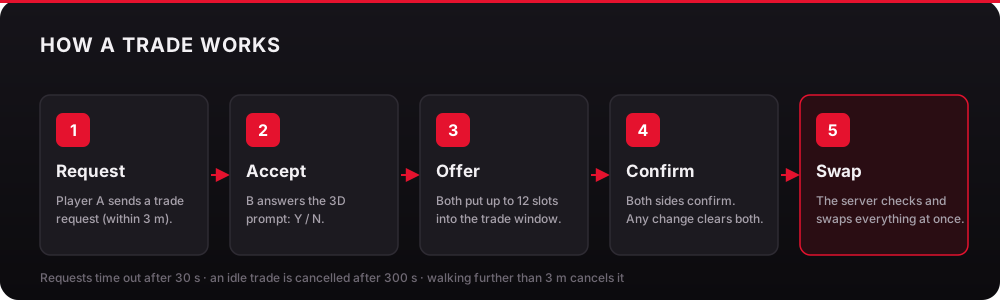
-
Send a request
Use the Trade fast action, drop an item on Trade, or pick Trade in the context menu. The other player must be within 3 metres. -
Accept or decline
The other player gets a request card with a countdown, even with the inventory closed. They pressYto accept orNto decline.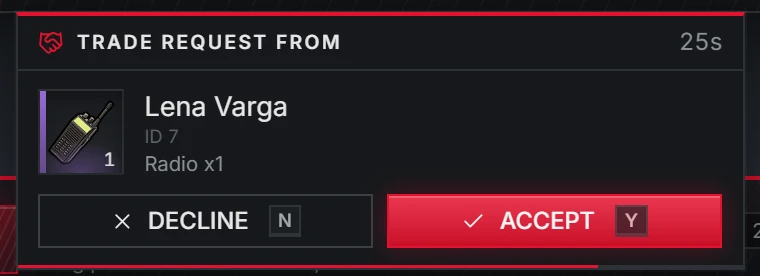
Trade request card -
Make offers
The trade window opens for both players. Each side puts up to 12 different slots on the table. -
Confirm
Both players confirm. Any change to either offer clears both confirmations, so nobody can swap an item at the last second. -
The swap
The server re-reads every offered stack from the live inventories, checks weight and free slots on both sides, runs theswapItemshooks, and moves everything in one step. If anything fails, every change is rolled back.
Trade settings
Setting in trade | Default | Meaning |
|---|---|---|
distance | 3.0 | Metres to send a request and to keep the trade running |
timeout | 30 | Seconds a request waits for an answer |
sessionTimeout | 300 | Seconds without activity before a trade is cancelled |
maxOffers | 12 | Different slots one player may offer |
keys.accept / keys.decline | Y / N | Answer a request with the inventory closed |
Players can rebind the accept and decline keys in Settings → Key Bindings → FiveM.
Opening another player's inventory
Searching another player, a trunk or a glovebox uses item discovery: items reveal themselves one by one, by rarity.
Dumpsters and trunks also play a search animation while they are open (search in data/obsi/interact.lua).