

With Obsi Inventory, clothes are items. Drag a piece onto the clothes column to put it on, drag it off to undress, and keep whole outfits on a hanger.
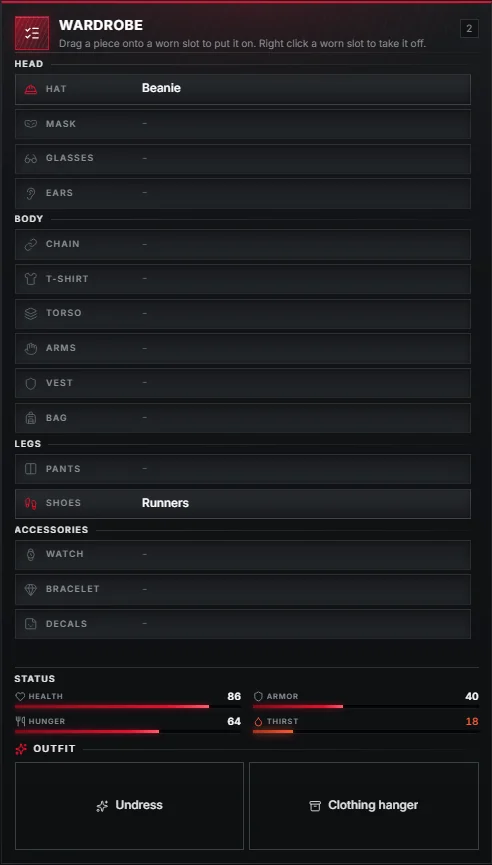
Dressing and undressing
- Put on: drag a clothing item onto its slot in the YOUR CLOTHES column, or onto the matching row of the wardrobe.
- Take off: drag the piece back into your inventory, or right-click the worn slot.
- Undress: the Undress fast action takes everything off at once.
Gloves follow the torso: the arms component is adjusted when you change the top.
A slot left empty falls back to a "bare" drawable, set per gender in nakedMale and nakedFemale.
Clothing slots
The column has a slot for every component and prop, in this order:
| Head | Body | Legs | Accessories |
|---|---|---|---|
| Hat (prop 0) | Chain (component 7) | Pants (component 4) | Watch (prop 6) |
| Mask (component 1) | T-shirt (component 8) | Shoes (component 6) | Bracelet (prop 7) |
| Glasses (prop 1) | Torso (component 11) | Decals (component 10) | |
| Ears (prop 2) | Arms (component 3) | ||
| Vest (component 9) | |||
| Bag (component 5) |
Underwear (top and bottom) is stored too, but never shown in the column.
Clothing items
A piece you undress that has no item of its own becomes the generic clothing item.
Its metadata remembers exactly what it was:
{ kind = 'component', id = 11, drawable = 15, texture = 0, gender = 'male', category = 'jackets', label = 'Denim jacket', imageurl = '...' }Any item can also be a piece of clothing on its own, through the clothing field:
['armor_vest'] = {
    label = 'Plate Carrier',
    weight = 2500,
    stack = false,
    rarity = 'rare',
    clothing = { kind = 'component', id = 9, male = { drawable = 12, texture = 0 }, female = { drawable = 13, texture = 0 } },
},
Hangers
The clothing_hanger item is a small stash that holds one outfit.
Use Put on hanger to hang everything you wear, and use the hanger to swap the stored outfit with the one you have on.
Appearance resources
Obsi Inventory works with illenium-appearance and fivem-appearance:
Setting in clothing | Default | What it does |
|---|---|---|
imageResource | 'illenium-appearance' | Resource that provides clothing pictures through getClothingImage |
saveAppearance | true | Saves the ped appearance after every change |
adoptAppearance | true | A piece the ped already wears becomes an item when its slot is empty |
externalAppearance | true | When a skin menu saves, its appearance wins over the worn items; removed pieces go back to the inventory |
Turning it off
The Clothing as items addon on the admin Addons page switches the feature off live, without a restart.