

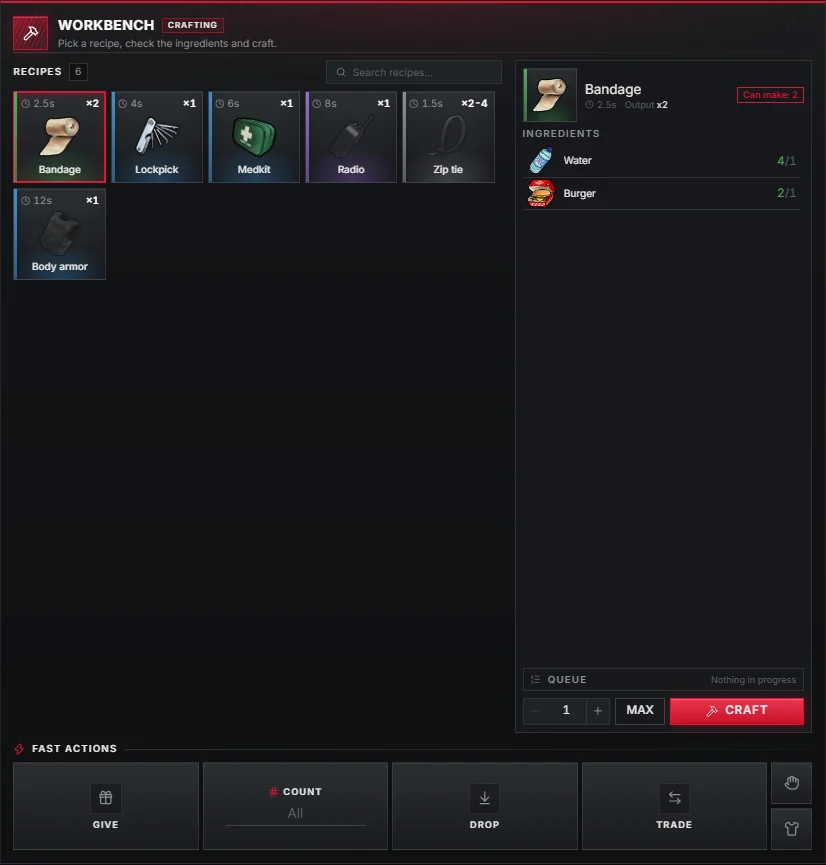
Crafting benches open in the right column as a recipe panel. Pick a recipe, check the ingredients, set how many to make and press CRAFT; the jobs line up in a queue.
Using a bench
- The recipe grid shows every item the bench can make, with its craft time.
- Select a recipe to see its ingredients and how many you have of each.
- Set the amount with −, + or MAX and press CRAFT.
- Running and waiting jobs appear under QUEUE, with a progress bar inside the inventory.
Defining a bench
Benches use the upstream data/crafting.lua format.
duration is shown in the panel and count is the output per craft.
data/crafting.lua
{
    name = 'workshop',
    label = 'Workshop',
    items = {
        {
            name = 'lockpick',
            ingredients = {
                scrapmetal = 3,
                WEAPON_HAMMER = 0.02,
            },
            duration = 4000,
            count = 2,
        },
    },
    points = { vec3(-1147.08, -2002.66, 13.18) },
},points are used without ox_target (a marker and E), zones with it.
Benches can also be created and edited on the admin Crafting benches page.